Context
This challenge presents an HTML page with intentionally obfuscated JavaScript. The goal is to analyze the code and find the hidden flag inside, without guessing it.

What is Obfuscation?
Obfuscation is the practice of making code readable by machines but hard to understand for humans. Unlike encryption, the code remains functional and accessible — it's just intentionally obscured.
- Renaming variables to meaningless names (
a,b,o…) - Encoding strings in hexadecimal (
\x35\x35\x2c...) - Unnecessarily complex logic to confuse the reader
- Red herring: the code appears to verify user input, but doesn't actually do so
When landing on the page, we are prompted to enter a password — curious, I typed one at random.

Obviously that's wrong — and it's mocking me.

After that, a blank page appears.
Source Code Analysis
By opening the page and inspecting the code (F12 → Sources), we find the following JavaScript:
function dechiffre(pass_enc){
    var pass = "70,65,85,88,32,80,65,83,83,87,79,82,68,32,72,65,72,65";
    var tab  = pass_enc.split(',');
    var tab2 = pass.split(',');
    var i,j,k,l=0,m,n,o,p = "";
    // ... complex logic ...
    p += String.fromCharCode(tab2[17]);
    pass = p; return pass;
}

String["fromCharCode"](dechiffre("\x35\x35\x2c\x35\x36\x2c\x35\x34\x2c\x37\x39\x2c\x31\x31\x35\x2c\x36\x39\x2c\x31\x31\x34\x2c\x31\x31\x36\x2c\x31\x30\x37\x2c\x34\x39\x2c\x35\x30"));

h = window.prompt('Entrez le mot de passe / Enter password');
alert( dechiffre(h) );
Key Observation: The Red Herring
The function dechiffre(pass_enc) does receive the user's input as a parameter,
but following the execution reveals that it completely ignores it.
It always returns the contents of the internal variable pass,
a hardcoded sequence of ASCII values.
FAUX PASSWORD HAHA. This is intentional — the real challenge lies elsewhere.
Step 1 — Decoding the Hex String
The most interesting line is this one:
String["fromCharCode"](dechiffre("\x35\x35\x2c\x35\x36\x2c\x35\x34\x2c\x37\x39\x2c\x31\x31\x35\x2c\x36\x39\x2c\x31\x31\x34\x2c\x31\x31\x36\x2c\x31\x30\x37\x2c\x34\x39\x2c\x35\x30"));
Each \xNN is a character encoded in ASCII hexadecimal.
Each \xNN = one character. For example:
We can use this handy ASCII table to convert hex to decimal:
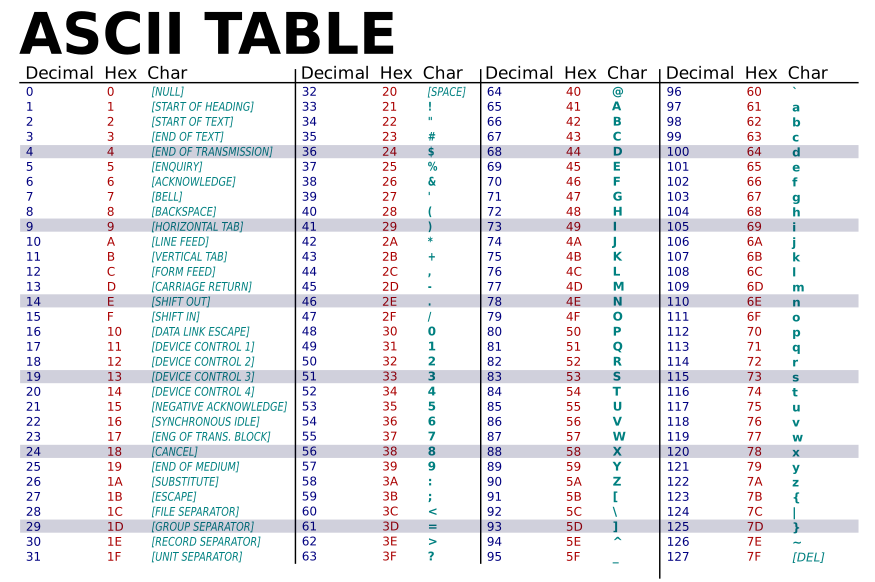
| Hex | Decimal | Character |
|---|---|---|
| \x35 | 53 | 5 |
| \x35 | 53 | 5 |
| \x2c | 44 | , |
| \x35\x36 | 53 + 54 | 5, 6 |
| \x2c | 44 | , |
| ... | ... | ... |
Decoding the full string gives us:
55,56,54,79,115,69,114,116,107,49,50
Step 2 — Applying String.fromCharCode
These values are then passed to String.fromCharCode() via dechiffre().
Each number maps to an ASCII character.
I wrote a small Python script to decode the decimal sequence into text:
# Decode decimal values to text
values = "55,56,54,79,115,69,114,116,107,49,50"

flag = ""
for val in values.split(','):
    flag += chr(int(val))

print("Flag:", flag)
Output:
Flag: 786OsErtk12
Conclusion
This challenge highlights two fundamental concepts in web security:
- Obfuscation protects nothing — the code is still readable with a little analysis
- The flag was hidden in the hex string passed as an argument, not in the user input
- Never trust apparent complexity in client-side JS
Flag
786OsErtk12
Have a good day! — @Swif2D